Sunday, August 23, 2015

How Do I Forward Texts Messages To Email

Many a times we feel the need to forward the text messages we send / received to email.

This could be just to take a backup of the messages or even for some legal proceedings etc.
For example :

  • Messages send/ received from the landlord having the word 'rent'
  • Messages send/ received from ex partner
  • Messages from selected contacts having specific words.  etc 
There are many ways in which you can forward the texts to email. In this post I describe the simplest method for this in Android phones - Install a simple application from PlayStore.

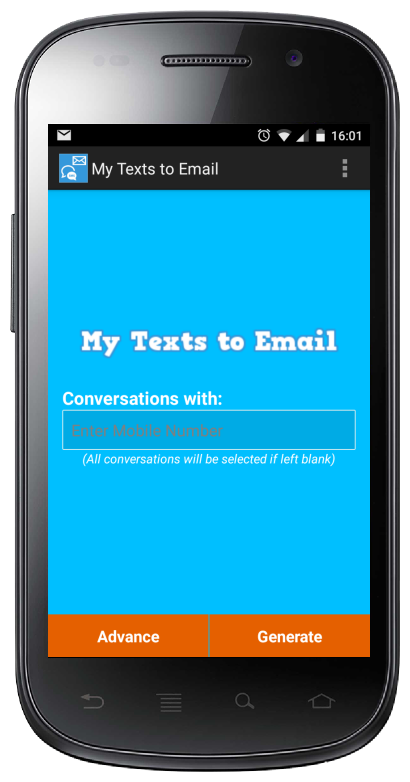
1. Install the below application from Play Store

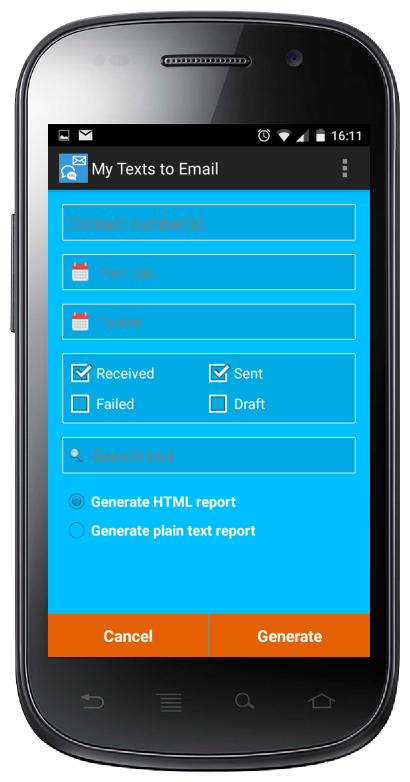
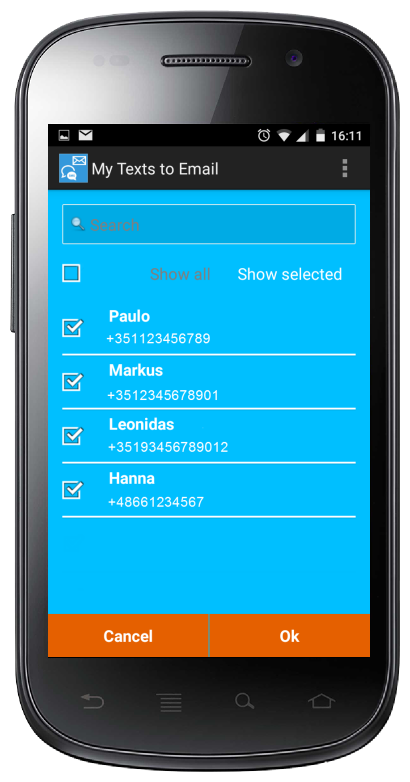
2. If you want select all messages from/to specific contacts , then choose the specific contacts by clicking on the 'Enter Mobilr Number' field.
3. You may also search for specific contacts.
4. If you need to provide more conditions like From/To Date, containing specific word etc then select the 'Advance' option.
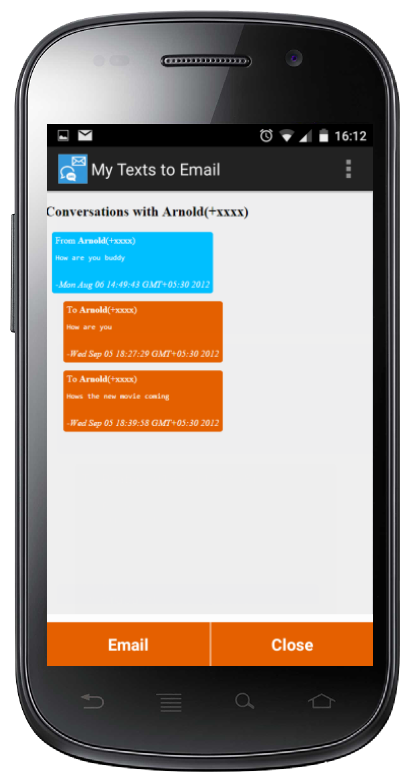
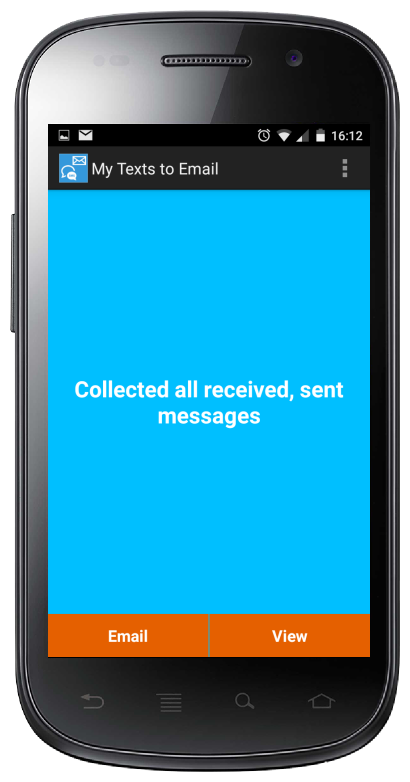
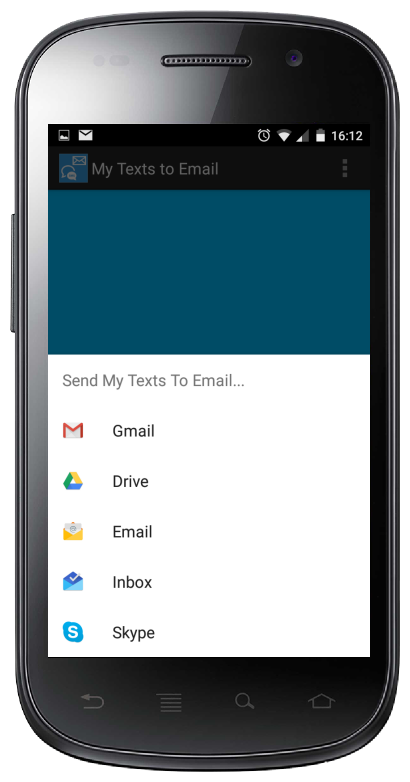
4. Once all the messages are collected (this will happen in seconds) you can view the report Or share the report as email/ Google Drive etc.


Monday, November 17, 2014

Challenge for Java programmers


Published a BeerBotChallenge for the Java developers. This is inspired from the FruitBots program.

You can find the details here :
https://github.com/RatheeshRavindran/BeerNinja


Monday, April 28, 2014

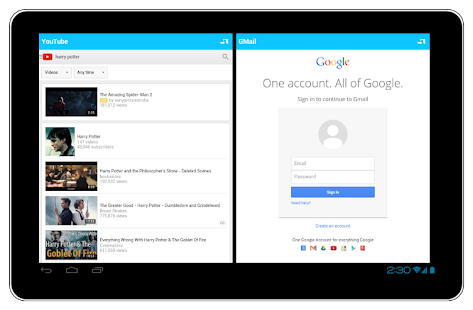
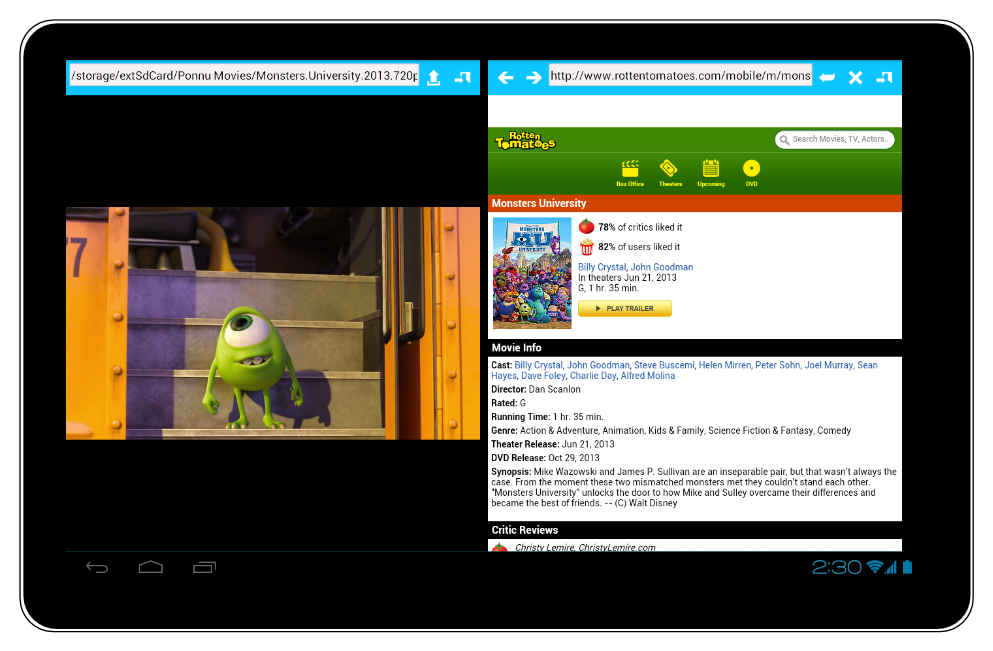
Using Multiple or Split Screens in Mobile device

One frustrating thing when using large screen mobile devices is the lack of support for using multiple screens.
I have a 10inch Tablet, Why shouldn't I be able to browse Wikipedia and take notes at the same time?

For unknown reasons, there is no support for this yet from Google Android.
Samsung tried solving this by supporting multiple screens but it is available only in the high end devices And there is mixed feedback from the user base.

There are number of applications in the Android market which are trying to fill this void at-least to some extent.

One such application I tried recently is 'Multi Screen Split' from 42 Labs.
I would rate it 4 star, do try it out if you are looking for a Productivity improvement application.

Get it here


Wednesday, November 20, 2013

PHP Equivalent for DESede/CBC/PKCS5Padding

Recently I tried porting an encryption implementation to PHP from Java.

It was not possible to touch the existing encryption/ decryption implementation So the requirement is to have the similar encryption implementation in PHP which will give same result as in Java.


The Java implementation is
    public String encryptTest(String message) throws Exception {
     final MessageDigest messageDigest = MessageDigest.getInstance("md5");
     String keyString = "AB12CD3EF4";
  final byte[] passwordDigest = messageDigest.digest(keyString.getBytes("utf-8"));
     final byte[] keyBytes = paddKeyString(passwordDigest);
     final Cipher cipher = Cipher.getInstance("DESede/CBC/PKCS5Padding");
     cipher.init(Cipher.ENCRYPT_MODE, new SecretKeySpec(keyBytes, "DESede"), new IvParameterSpec(new byte[8]));
     final byte[] encryptedText = cipher.doFinal(message.getBytes("utf-8"));
     return Base64.encodeBase64String(encryptedText);
    }

 private byte[] paddKeyString(final byte[] passwordDigest) {
  final byte[] keyBytes = Arrays.copyOf(passwordDigest, 24);
  int pos = 16;
     for (int index = 0; index < 8;) {
      keyBytes[pos++] = keyBytes[index++];
     }
  return keyBytes;
 }

After couple of hours of trial and error , got the following PHP implementation which will produce the same result as the Java counterpart.
function encryptText_3des($plainText, $key) {
 $key = hash("md5", $key, TRUE); 
 for ($x=0;$x<8;$x++) {
  $key = $key.substr($key, $x, 1);
 }
 $padded = pkcs5_pad($plainText,
        mcrypt_get_block_size(MCRYPT_3DES, MCRYPT_MODE_CBC));
 $encrypted = base64_encode(mcrypt_encrypt(MCRYPT_3DES, $key, $padded, MCRYPT_MODE_CBC));
    return $encrypted;
}
Note: pkcs5_pad method is available here http://php.net/manual/en/ref.mcrypt.php
PHP is fun , I am going to give it little more time :)

Tuesday, November 12, 2013

Links for Configuring Apache , PHP in Windows with SSL


Installing Apache with PHP and SSL is relatively easy, But still there were couple of tricky steps. Following are the links I used for installing and configuring Apache with SSL, PHP (including cURL module).

Installing Apache in Windows

Remember to download the correct Apache binary. For example - the one I downloaded is 'httpd-2.2.25-win32-x86-openssl-0.9.8y.msi' as I required SSL also.
I choose to go with the default options.

If everything succeeds , you will be able to see "It Works!" when you try the URL "localhost" or "localhost:8080"

Installing PHP and configuring Apache

Follow this link http://www.thesitewizard.com/php/install-php-5-apache-windows.shtml
Quick summary- following entries will need to be added to httpd.conf file 
  1. LoadModule php5_module c:/php/php5apache2_2.dll
  2. AddType application/x-httpd-php .php
  3. PHPIniDir "c:/php"
Create a sample php file PHPinfo.php in the htdocs folder with content 
<!DOCTYPE html>
<html>
<body>
<?php
PHPinfo();
?>
</body>
</html>
 Try the link 'http://localhost/PHPinfo.php', You will see the information about PHP if everything succeeds.
If you are planning to use cURL module remember to enable those lines in the php.ini file
e.g.- extension=php_curl.dll
Note: If this is not working , add 'c:\php' and 'c:\php\ext' to PATH environment variable.


For me things worked only after creating a symbolic link for 'C:\Program Files (x86)\Apache Software Foundation'.


Sunday, August 11, 2013

Android Free Preschooler Number Learning Application


Kids Number Learning app is a free Android application which will help the preschoolers in learning numbers and the parents in checking the skill of their kids. 
If you are looking for a free and simple app for your preschoolers then this is a must.

Rating : 4.5/5

Game Play
The application has three modes

  • One digit
  • Two digit
  • Three digit
The application will display a number in letters based on the mode selected. Child should enter the number in digits. The app uses randomization so that the child gets different numbers every time.

Links
Market URL : https://play.google.com/store/apps/details?id=com.fortytwo.mathapps.kidsnumberlearning.activity

You may also search for 'com.fortytwo.mathapps' in PlayStore to locate the application.

Screen shots


    Saturday, June 22, 2013

    Top Free Android Game Beach Buggy Blitz Review


    Beach Buggy Blitz is a gyroscopic game which is a combination of end less running and racing.
    If you are a fan of games like Subway Surfers then you will love this game.

    Rating 4.5/5

    Game Play
    Use your beach buggy to go as far as possible. You will start with 30 seconds and there are different check points on the way which will extend the time.
    There are various obstacles on the way like giant Crabs, huts , birds and so on. Though it is kind of cool to hit these , it will slow you down from reaching the next check point.

    Positives

    • Good customization and controls.

                It is possible to control the vehicle through 
      1. Tilting the device
      2. Touching the edges of the device.
      3. Using the Game Pad.
      4. Controls for break
    • Customized for Tablets.
      • Customized version available for tablets to make use of the full potential. 
    • Graphics is good.
    • Integrated to Google Play Game Service.
      • One of the early applications to do this.
    • All together one of the best free games available in Android market.

    Negatives

    • Graphics can be still improved.
      • Even though Graphics is good and enjoyable , at some times it clearly shows the need for improvement.
      • For example, the way the birds move , behave when they get hit is not good. Some times the birds just sync in to the sand.
    • The time gets added in each check point is too short for the children.
      • Children try hitting the different obstacles on the way, so even reaching the first check point is difficult for them.
    • Other riders are not collecting the gold coins. 
      • It will be more interesting if other riders (CPU) also collect the available gold coins.
    Other Details
    Description from Google Play Store
    Drive your hot-rod beach buggy as far as you can into the uncharted depths of a mysterious tropical island!
    Swerve and smash through a gorgeously detailed and completely destructible world packed with Tiki statues, grass shacks, giant crabs, lava monsters...even yetis! Explore sun-swept beaches, secret caves, fog-shrouded swamps, ruined temples and erupting volcanoes in this action-packed quest of discovery and mayhem!
    Build a performance-boosting collection of upgrades and powerups! Unlock new vehicles like the Lightning muscle car and Rock Stomper monster truck. Upgrade your cars and customize their paint jobs. Collect wacky new characters. Unlock and upgrade amazing powerups like the fire-spitting Boost, the coin-tastic Coin Bubble, and a Shield that turns you into a unstoppable smash-everything force of destruction!
    Developer Website
    http://www.vectorunit.com/

    Screenshots


    Tuesday, June 18, 2013

    Google Play Store containing Adult Content


    What is more difficult than convincing your wife that you don't need a haircut?  It is finding a good application  easily in Google Play Store!

    To top the difficulty , there are enough adult content freely available in the play store.
    Now imagine , browsing the Play Store with your four year old daughter to find her favorite puzzle game and finding the adult games with nude pictures listed as the 'top free' apps.

    Check the screenshot below, this is taken from the 'Top Free apps'


    I do understand that , people of all age groups use Google Play Store. But being a responsible company, why cant Google set the default content filter to avoid showing the adult content?

    Until Google realize this, we will have to explicitly set the content filter to avoid adult content.

    Open Google Play Store
        Go to Context Menu
        Click on Settings

    Click on 'Content Filtering'

    Select 'Every one'/ 'Low Maturity'

    Click on 'OK' and provide a PIN when asked for.
    This should prevent the adult content from appearing.


    Saturday, June 15, 2013

    Samsung Galaxy Tab is Sluggish and Hangs after JellyBean Upgrade


    My Samsung Galaxy Tab2 10.1 started behaving weirdly all of a sudden.
    Symptoms

    • Applications are not responding
    • Accessing settings options hangs or not responding for a long time.

    The main events which happened before this issue are

    • Online upgrade to JellyBean from ICS.
    • New micro SD card is added

    Ideally none of the above should cause the device 'Sluggish', But the fact is that my tab became unusable.

    After a quick internet research , I was 'happy' to realize that there are many unfortunate souls out there who faced the same issue after JellyBean upgrade.

    'Factory Reset' seems to be the only solution for this issue.
    But before that I decided to try other options like -

    1. The data in the tablet was getting back up to Google server. This could be a costly service So disabled it from the Settings -> Backup And Restore.
    2. Installed AVG anti virus for tab : In the first scan it identified and disabled an unathorized service which was performing Network access.
    3. Uninstalled all applications.
    4. Removed SD card.

    Restarted the tablet (Press and hold the power button), and it started working normally.
    But the happiness was short lived, after some time I inserted the micro SD card again. And the hang issues started again!

    With this I agreed that Samsung won and I lost and decided to go ahead with the 'Factory Reset'.
    For doing this- select the option from Settings-> Backup and Restore-> Factory Reset-> Erase all data.

    This operation takes only couple of minutes.
    After this , the devices is back to normal state.

    Note:

    1. Backup all the data before performing the factory reset.
    2. Try other options mentioned above before executing Factory reset, it may solve the problem.


    Sunday, June 2, 2013

    Moving Apps to External Storage in Samsung Galaxy Tab


    After updating the Samsung Galaxy Tab2 to JellyBean, I realized that it is no longer possible to move the applications to external storage.

    Application like 'App2SD' is giving the error message -
    "the device does not have a real primary external storage, or the primary external storage is emulated"

    The reason is -Android removed the support for moving the apps to external storage in the newer releases of the OS! So if you are using a device with Android version later than 3.0 then moving apps to SD card is not possible.
    There is no easy and reliable app or workaround which will help you to do this.

    There are different theories why this happened -

    1. Google in general trying to kill SD cards.
      1. Remember, google devices like Nexus does not support external storage.
    2. Any thing to do with the Patent issues with Microsoft?
      1. Android is said to be the most successful mobile operating system of Microsoft, as Microsoft gets $$ for each Android phone sold. 
    Read about Google's explanation for the lack of SD card support in Nexus devices here

    May be the basic users will not even notice the lack of SD card support, But this IS a disadvantage for the advanced users. With the new games increasing in size it will be pain to decide which ones to uninstall before installing a new one.

    Looks like experts at Google are telling that 8Gb/16Gb in a mobile device is enough for any one.
    I hope they will remember another famous quote by Bill Gates 
    "640K ought to be enough for anybody "

    Monday, May 27, 2013

    Looking for Technical Leaders and Senior Developers


    There are openings in NokiaSiemensNetworks for the positions of Technical Leaders and Senior Developers for Bangalore location.

    Please send the resume , if you have

    • Minimum three years of experience.
    • Very good  technical strength.
    • Good software design knowledge.

    Sunday, May 26, 2013

    Upgrading Samsung Galaxy Tab2 to JellyBean


    To my surprise, the Samsung Galaxy Tab2 PT5100 I bought was having Android ICS. So started the experiments on how to get it upgraded to JellyBean.

    First what I tried was using the Samsung Kies software available in my laptop for upgrading the firmware, but that was not even recognizing the device!

    As any good user of Microsoft Windows does, I too uninstalled Kies completely and installed again the latest version downloaded from Kies download link . Started the new Kies application thinking that will magically upgrade my Tab to JellyBean. But life is never that easy when it comes to Samsung Kies software.

    It started giving the error "the ordinal 9272 could not be located in the ..."
    After some research - came to the possible solution of installing the latest '.Net' framework
    .Net Framework

     The moment I see such 'for programmer' error message from any software, I know things will not be smooth. Here also, on restart Kies started giving another error "

    The ordinal 7426 could not be located in the dynamic link library mfc90u.dll"

    This time possible solution was updating the VisualC++ libraries from here VisualC++ download
    Also have a look at this Microsoft discussion thread discussion forum.

    Luckily the problems with the Kies disappeared now(Frankly I was expecting to see couple of more cryptic error messages). But the Kies proudly reported that my Tab is having the latest software and no upgrade is available!
    With this I stopped my efforts to upgrade the software using Kies.
    But luckily the next day , a notification appeared in Tab indicating that an "Upgrade is available", I jumped and accepted the notification before it disappears. In around 20 min the device was upgraded to Android 4.1.2 JellyBean. Looks like we can still believe in miracles in this world!

    A request to Samsung -
    If the intention behind creating Kies is helping the customers in tasks like upgrading Firmware, then there are multiple areas which needs improvement. Starting with the first perception point of executing the software successfully. 
    But if the intention is teaching customers about what kind of 'ordinals' are in the mfc dll then it is doing the job beautifully.


    Sunday, April 28, 2013

    Kanban Board Digital


    Recently I attended a short meeting explaining the benefits of adopting Kanban, it was impressive.
    What Wikipedia tells about Kanban -
    Kanban is a method for developing software products and processes with an emphasis on just-in-time delivery while not overloading the software developers. In this approach, the process, from definition of a task to its delivery to the customer, is displayed for participants to see and developers pull work from a queue.

    Over all I think the Kanban implementation will help the scrum teams in managing the Feature Components in a more efficient way.

    Since having some free time now (having short vacation ;) ), I thought of developing a digital Kanban Board.

    1. This is a Java Swing based tool. No third party libraries used.
    2. No installation is required.
    3. Completely Free to use. 

    You can download the tool from here.
    Contents of the zip file are -
    • BacklogNames.txt
      • The names of the backlogs you want to have in the KanbanBoard. Feel free to edit the content.
    • KanbanBoard.jar
      • Jar file containing all Java code. You can execute this by 'double clicking ' on it or by executing the command 'java -jar KanbanBoard.jar' without quotes in a command prompt.
    • run.bat
      • Batch file to execute the program in windows machines.  Execute the batch file file double clicking on it.
    Complete source code is available here 
    Please note: This is provide AsIs and there is no guarantee on the quality. Please use it at your own risk.

    Look at the video of the tool 

    Screenshot#1

    Screenshot#2

    Current version of the tool uses the file system for persisting the data. But it can be easily enhanced to use database if required.

    In the next version I will provide the option to integrate with any database. 

    Friday, March 1, 2013

    Creating SoS Android Application in 30 minutes using TelephonyManager


    There are number of free and paid 'SoS' applications in the Android market , which will help the user to send a message with location details to pre-configured numbers.

    Let us check here how to develop such an Android application in less than 30 minutes.

    Development Environment :
    Android Development Tools Bundle
    Build - v21.0.1-543035

    We can start by creating an 'Android Application Project'


    Click 'next' on this and the next two screens.
    Select 'FullScreenActivity' in the 'Create Activity' page


    Give the activity name as 'BachaoActivity' and click on 'Finish'
    The generated activity will have some code for using systemUiHider, we can remove these as the functionality is not required.

    After doing the cleanup , the activity code will be like below


    package com.team.bachao;
    package com.team.bachao;
    
    import com.team.bachao.util.BachaoUtility;
    import android.app.Activity;
    import android.os.Bundle;
    import android.view.View;
    import android.widget.Toast;
    
    /**
     * An example full-screen activity that shows and hides the system UI (i.e.
     * status bar and navigation/system bar) with user interaction.
     * 
     */
    public class BachaoActivity extends Activity {
    
     @Override
     protected void onCreate(Bundle savedInstanceState) {
      super.onCreate(savedInstanceState);
    
      setContentView(R.layout.activity_bachao);
     }
    
     @Override
     protected void onPostCreate(Bundle savedInstanceState) {
      super.onPostCreate(savedInstanceState);
    
     }
    
    }
    

    Next we need a add a on click listener to the button. This can be done by using android:onClick
    Complete activity_bachao.xml layout content is given below

    <FrameLayout xmlns:android="http://schemas.android.com/apk/res/android"
        xmlns:tools="http://schemas.android.com/tools"
        android:layout_width="match_parent"
        android:layout_height="match_parent"
        android:background="#0099cc"
        tools:context=".BachaoActivity" >
    
        <!--
             This FrameLayout insets its children based on system windows using
             android:fitsSystemWindows.
        -->
    
        <FrameLayout
            android:layout_width="match_parent"
            android:layout_height="match_parent"
            android:fitsSystemWindows="true" >
    
            <LinearLayout
                android:id="@+id/fullscreen_content_controls"
                style="?buttonBarStyle"
                android:layout_width="match_parent"
                android:layout_height="wrap_content"
                android:layout_gravity="center_vertical|center_horizontal"
                android:background="@color/black_overlay"
                android:orientation="horizontal"
                tools:ignore="UselessParent" >
    
                <Button
                    android:id="@+id/dummy_button"
                    style="?buttonBarButtonStyle"
                    android:layout_width="0dp"
                    android:layout_height="wrap_content"
                    android:layout_weight="1"
                    android:text="@string/dummy_button"
                    android:onClick="onBachao" />
            </LinearLayout>
        </FrameLayout>
    
    </FrameLayout>
    

    Now the basic stuff is available. Let us look at what needs to be done when user clicks on the SoS button.
    First we need to read the network information like country code, operator ID and operator name, for this we  can use the TelephonyManager provided by android.


    TelephonyManager telephonyManager = (TelephonyManager) context.getSystemService(Context.TELEPHONY_SERVICE);
      if (telephonyManager != null) {
       operatorInfo.countryCode = telephonyManager.getNetworkCountryIso(); 
       operatorInfo.operatorID = telephonyManager.getNetworkOperator();
       operatorInfo.operatorName = telephonyManager.getNetworkOperatorName();
      } else {
       Toast.makeText(context, "Unable to read telephony manager"  
          , Toast.LENGTH_SHORT).show();
      }


    Another information which will be useful to collect will be the cell location. But this will be possible only for the GSM connections

    if (telephonyManager.getPhoneType() == TelephonyManager.PHONE_TYPE_GSM) {
        GsmCellLocation cellLocation = (GsmCellLocation)telephonyManager.getCellLocation();
        operatorInfo.cellID = cellLocation.getCid();
        operatorInfo.locationAreaCode = cellLocation.getLac();
       }


    Next information we want to read is the location coordinates like Lat and Lon For this we can use the LocationManager provided by Android
    final LocationManager locationManager;
    locationManager = (LocationManager) context.getSystemService(Context.LOCATION_SERVICE);
    

    Using the location manager instance, we can find the list of location providers available in the device. Some of the possible providers are GPS_PROVIDER - Use GPS to find the location NETWORK_PROVIDER - Use Network to find the location PASSIVE_PROVIDER - This is of not much use to us in this context.
    List<String> providerNames = locationManager.getProviders(true);
      
      String providerName = null;
      if (providerNames != null && providerNames.size() > 0) {
       if (providerNames.contains(LocationManager.GPS_PROVIDER)) {
        providerName = LocationManager.GPS_PROVIDER;
       } else if (providerNames.contains(LocationManager.NETWORK_PROVIDER)) {
        providerName = LocationManager.NETWORK_PROVIDER;
       }
      }


    We can also find the provider from location manager which is matching a set of conditions.
    Criteria criteria = new Criteria();
    criteria.setAccuracy(Criteria.ACCURACY_COARSE);
    criteria.setAltitudeRequired(false);
    criteria.setPowerRequirement(Criteria.POWER_LOW);
    String providerName = locationManager.getBestProvider(criteria, true);
    

    Once the provider is available we can request for the current location information. But for this we need to use a location listener.
    location = locationManager.getLastKnownLocation(providerName);
       
       LocationListener locationListener = new LocationListener() {
    
       public void onLocationChanged(Location location) {
        Toast.makeText(context, "on location changed " , Toast.LENGTH_SHORT).show();
        
        locationManager.removeUpdates(this);
        processLocation(context, location);
       }
    
       public void onProviderDisabled(String arg0) {
        Log.e("WTF", "provider disabled!");
        Toast.makeText(context, "disabled " , Toast.LENGTH_SHORT).show();
       }
    
       public void onProviderEnabled(String arg0) {
        // do nothing.
       }
    
       public void onStatusChanged(String arg0, int arg1, Bundle arg2) {
        // Do nothing.
       }
       
      };
      
      locationManager.requestLocationUpdates(providerName, 0, 0, locationListener);
    

    onLocationChanged method will be called when the new location is available from the provider.

    Now we have all the information available to send to the emergency contacts. So let us send an SMS with this information. For this we can use the SmsManager provided by Android
    StringBuilder sb = new StringBuilder();
      sb.append("Emergency! Please reach out\n");
      if (location != null) {
       sb.append("Lat : " + location.getLatitude() + " Lon : " + location.getLongitude());
      }
      sb.append(" CountryCode : " + operatorInfo.countryCode);
      sb.append(" OperatorID : " + operatorInfo.operatorID);
      sb.append(" OperatorName : " + operatorInfo.operatorName);
      sb.append(" \nCellID : " + operatorInfo.cellID);
      sb.append(" LocationAreaCode : " + operatorInfo.locationAreaCode);
    
      SmsManager smsManager = SmsManager.getDefault();
      smsManager.sendTextMessage("%emergencyContactNumber%", null, sb.toString(), null, null);


    Replace %emergencyContactNumber% with actual mobile number. Another way to send SMS is through using Intent, but this will only open the default SMS application with the message , will not send it.
    Intent smsIntent = new Intent(Intent.ACTION_SENDTO, Uri.parse("sms:%emergencyContactNumber%"));
    smsIntent.putExtra("sms_body", sb.toString());
    context.startActivity(smsIntent);


    But before we use test this application, required permission requests must be added in the AndroidManifest file
    <uses-permission android:name="android.permission.ACCESS_FINE_LOCATION">
    <uses-permission android:name="android.permission.ACCESS_COARSE_LOCATION">
    <uses-permission android:name="android.permission.READ_PHONE_STATE">
    <uses-permission android:name="android.permission.SEND_SMS">
    </uses-permission></uses-permission></uses-permission></uses-permission>


    Complete code for BachaoActivity.java
    package com.team.bachao;
    
    import com.team.bachao.util.BachaoUtility;
    import com.team.bachao.util.SystemUiHider;
    
    import android.annotation.TargetApi;
    import android.app.Activity;
    import android.os.Build;
    import android.os.Bundle;
    import android.os.Handler;
    import android.view.MotionEvent;
    import android.view.View;
    import android.widget.Toast;
    
    /**
     * An example full-screen activity that shows and hides the system UI (i.e.
     * status bar and navigation/system bar) with user interaction.
     * 
     * @see SystemUiHider
     */
    public class BachaoActivity extends Activity {
     private BachaoUtility handler;
    
     @Override
     protected void onCreate(Bundle savedInstanceState) {
      super.onCreate(savedInstanceState);
    
      setContentView(R.layout.activity_bachao);
      handler = new BachaoUtility(BachaoActivity.this);
      Toast.makeText(BachaoActivity.this, "Initialized", Toast.LENGTH_LONG).show();
     }
    
     @Override
     protected void onPostCreate(Bundle savedInstanceState) {
      super.onPostCreate(savedInstanceState);
    
     }
    
     public void onBachao(View view) {
      handler.bachao();
     }
     
    }
    

    Complete code for BachaoUtility.java
    package com.team.bachao.util;
    
    import java.util.List;
    
    import com.team.bachao.BachaoActivity;
    
    import android.content.Context;
    import android.location.Location;
    import android.location.LocationListener;
    import android.location.LocationManager;
    import android.os.Bundle;
    import android.telephony.SmsManager;
    import android.telephony.TelephonyManager;
    import android.telephony.gsm.GsmCellLocation;
    import android.util.Log;
    import android.widget.Toast;
    
    public class BachaoUtility {
     
     private Location location;
     private OperatorInfo operatorInfo;
     private BachaoActivity context;
     
     public BachaoUtility(BachaoActivity context) {
      this.context = context;
     }
     
     public void bachao() {
      operatorInfo = new OperatorInfo(); 
      TelephonyManager telephonyManager = (TelephonyManager) context.getSystemService(Context.TELEPHONY_SERVICE);
      if (telephonyManager != null) {
       operatorInfo.countryCode = telephonyManager.getNetworkCountryIso(); 
       operatorInfo.operatorID = telephonyManager.getNetworkOperator();
       operatorInfo.operatorName = telephonyManager.getNetworkOperatorName();
       if (telephonyManager.getPhoneType() == TelephonyManager.PHONE_TYPE_GSM) {
        GsmCellLocation cellLocation = (GsmCellLocation)telephonyManager.getCellLocation();
        operatorInfo.cellID = cellLocation.getCid();
        operatorInfo.locationAreaCode = cellLocation.getLac();
       }
      } else {
       Toast.makeText(context, "Unable to read telephony manager"  
          , Toast.LENGTH_SHORT).show();
      }
      
      //
      // Get the location service.
      
      final LocationManager locationManager;
      locationManager = (LocationManager) context.getSystemService(Context.LOCATION_SERVICE);
      
      
      //
      // Get location coordinates
    //  Criteria criteria = new Criteria();
    //  criteria.setAccuracy(Criteria.ACCURACY_COARSE);
    //  criteria.setAltitudeRequired(false);
    //  criteria.setPowerRequirement(Criteria.POWER_LOW);
    //  String providerName = locationManager.getBestProvider(criteria, true);
      List<String> providerNames = locationManager.getProviders(true);
      
      String providerName = null;
      if (providerNames != null && providerNames.size() > 0) {
       if (providerNames.contains(LocationManager.GPS_PROVIDER)) {
        providerName = LocationManager.GPS_PROVIDER;
       } else if (providerNames.contains(LocationManager.NETWORK_PROVIDER)) {
        providerName = LocationManager.NETWORK_PROVIDER;
       }
      }
    
       
      if (providerName != null) {
       location = locationManager.getLastKnownLocation(providerName);
       
       LocationListener locationListener = new LocationListener() {
    
       public void onLocationChanged(Location location) {
        Toast.makeText(context, "on location changed " , Toast.LENGTH_SHORT).show();
        
        locationManager.removeUpdates(this);
        processLocation(context, location);
       }
    
       public void onProviderDisabled(String arg0) {
        Log.e("WTF", "provider disabled!");
        Toast.makeText(context, "disabled " , Toast.LENGTH_SHORT).show();
       }
    
       public void onProviderEnabled(String arg0) {
        // do nothing.
       }
    
       public void onStatusChanged(String arg0, int arg1, Bundle arg2) {
        // Do nothing.
       }
       
      };
      
      locationManager.requestLocationUpdates(providerName, 0, 0, locationListener);
      }
      
      sendMessage();
    
      //
      // Send facebook update
      
      //
      // Send twitter update
      
      //
      // record audio
      
      //
      // record video
      
      //
      // Send mail
     }
     
     public void processLocation(BachaoActivity context, Location location) {
      Toast.makeText(context, "Lat : " + location.getLatitude()
        + "\n Lon : " + location.getLatitude(), Toast.LENGTH_LONG).show();
      this.location = location;
      //
      // Send message
      sendMessage();
      
     }
    
     private void sendMessage() {
      StringBuilder sb = new StringBuilder();
      sb.append("Emergency! Please reach out\n");
      if (location != null) {
       sb.append("Lat : " + location.getLatitude() + " Lon : " + location.getLongitude());
      }
      sb.append(" CountryCode : " + operatorInfo.countryCode);
      sb.append(" OperatorID : " + operatorInfo.operatorID);
      sb.append(" OperatorName : " + operatorInfo.operatorName);
      sb.append(" \nCellID : " + operatorInfo.cellID);
      sb.append(" LocationAreaCode : " + operatorInfo.locationAreaCode);
    
    //  Intent smsIntent = new Intent(Intent.ACTION_SENDTO, Uri.parse("sms:%emergencyContactNumber%"));
    //  smsIntent.putExtra("sms_body", sb.toString());
    //  context.startActivity(smsIntent);
      
      SmsManager smsManager = SmsManager.getDefault();
      smsManager.sendTextMessage("%emergencyContactNumber%", null, sb.toString(), null, null);
     }
    }
    

    In the next version I will integrate audio/ video recording, sending the data via mail , updating in facebook/twitter.
    Saturday, June 30, 2012

    Lunch @ Fisherman's Wharf Bangalore

    Recently heard about "The Fisherman's Wharf" and thought of trying it today. After the usual Saturday shopping went to the restaurant for Launch buffet.

    For me the initial and most important perception points when visiting any restaurant are :

    • Car Parking
    • Time to get seated
    • Time to take the first order

    Car parking was well organized and assistant was also available. Front desk staff was really quick and got a good table with in minutes. The restaurant was crowded. Luckily I thought of calling in advance otherwise wait for the table could have been long.

    There was a Kannada star in the adjacent table (I think it was Sudeep). luckily he, staff and other guests were acting normally.

    Rating : The ambiance is very good
    9/10

    Food is good. Options for Welcome drink was beer or mock-tail. Only Fosters was available, I hope they will add more varieties.
    8/10

    http://thefishermanswharf.in


    Monday, June 25, 2012

    TwLauncher 'Force Stop' issue

    Yesterday I realized that the desktops in my Samsung Galaxy S is full and for most of the applications there are 3 to 4 links in the desktop (thanks to my daughter). So started a cleanup work by moving the unnecessary links to the recycle bin.
    I was hoping that the phone may be faster once I finish the cleanup, but to my surprise phone stopped responding !!

    'Force Close' error message for the TwLauncher started coming continuously. It was not possible to access any applications, settings etc but phone functionality/ contacts was ok. The smartphone almost became a brick.

    From Android experience I knew that some how if I reset data for the TwLauncher things should work but the problem was that it was not possible to go to the 'Manage Applications' link.

    But finally after couple of painful hours I managed to make my phone work again.
    Following are the steps (for other urfortunate guys using TwLauncher)
    1. Try to invoke google search box. This can be done by pressing and holding the context menu button.
      But you will have to really fight with the 'Force Close' messages as they will be repeatedly appearing.
      Keep on trying this , if you are lucky after sometime the search box will appear.

    2. Ensure that the mode of the search box is 'Apps' (mode can be changed by clicking the button to the left of search box ).

    3. Search for "setting ", this will launch the Settings

    4. In Settings, go to 'Applications' -> 'Manage Applications' -> 'All' tab

    5. Select TwLauncher app from the list and click 'Clear Data', this will recover the phone.

    Other options considered are
    i. Install another launcher like 'GO Launcher'
       This may not help if the issue already occured, but it will be a good idea to install such alternate launcher to help in future.
    'Go Launcher' is available for free from Google Play 

    ii. Cleaning the TwLauncher data in USB mode
    Try connecting the phone to Laptop in USB mode, if this works then the Launcher data can be cleared.

    iii. Factory reset
    This is the last option if nothing else works.

    Note: Your custom screens may be lost once you clear the TwLauncher data.

    Are you looking for good free Android educational application for Preschoolers?
    Try this - https://play.google.com/store/apps/details?id=com.fortytwo.mathapps.kidsnumberlearning.activity
    Review is available here - http://crashingnhanging.blogspot.in/2013/08/android-free-preschooler-number.html


    Saturday, June 23, 2012

    g|days in India

    Finally google days event in India !
    Venues are Chennai, Bangalore, Hyderabad, Delhi and Mumbai

    Since the space is limited , register today itself.
    For details visit : https://sites.google.com/site/gindia12/

    Tuesday, January 31, 2012

    Introduction

    JMock is the famous library which can be used for working with Mock Objects.
    (Please check www.MockObjects.com to know more about Mock Objects.) . How ever you might be excited to know that Mock Objects are not just Stubs!! They give a different approach to unit testing.
    So finally testing is also becoming as interesting as Coding.
    In simple words we can say that a mock object is something which can be used for testing the behavior of other objects. It will mimic the behavior of an actual class / interface.
    A Mock object can also observe how other objects uses its methods and compare with the expected behavior. (I will explain this in detail with code sample.)

    This means that we can test and verify how our class uses the available environment. 
    Let's assume you are developing a Customer class which has to interact with a BookShopclass. But unfortunately BookShop class your friend is developing and as usual it is not available yet. So naturally we will decide to use a Mock Object of BookShop instead of an actual instance. 
    Customer has function doTransaction().
    BookShop has methods pay(Money) , Book getBook()
    Using JMock we will be able to specify that getBook() is always called only after pay().
    So if anywhere in our doTransaction method if getBook is called with out pay() it will result in an error with bright red colour while testing it. 
    This way we can ensure that our class uses the available interface in the desired way.
    In a TestDrivenDevelopment environment this means that interface problems can be found even before the actual coding of it starts.
    JMock makes our life easier by creating mock objects dynamically and providing features to specify expectations (How it should behave, etc).


    Download Link

    The JMock jar/zip can be downloaded from www.JMock.org
    This can be added as external jar file in your Eclipse project.

    Using JMock

    Here comes the interesting part!
    Lets develop as class called DispFile , which is a highly useful class for displaying a given file in console.
    DispFile class uses the IFileHandler interface for the file operations .
    Code for IFileHandler

    public interface IFileHandler {   public void open(String filename) ;   public void close() ;   public String read() ;    } 
    
    
    Code for DispFile 
    public class DispFile {     public DispFile()  {     }    
         /**      * Business method to display the given file line by line      */     public boolean display(String filename)  {         
      Boolean status = true;         
      try   {             
       IFileHandler fileIntf = new FileHandler();             
       fileIntf.open(filename);             
       String line = null;             
       while ((line = fileIntf.read()) != null)    {                 
        System.out.println(line);             
       }            
       fileIntf.close();         } catch (Exception e)    {             
      Status = false;         
     }        
     return status;     } } 
    
    
     Here the line "new FileHandler" is the problem! We know the actual implementation is not yet available. So we have to use a MockObject for IFileHandler instead of an actual instance.  We must change the class to make it testable . The changes are minimal and it is a low price to pay for getting the testability with Mock Objects. This refactoring also makes the design cleaner.  The modified code is given below. 


    public class DispFile {   
    ... /** Business method to display the given file line by line */   
    public boolean display(String filename) {    
    Boolean status = true; 
    Try {     
    IFileHandler fileIntf = getFileHandler();     
     ....       
    }catch (Exception e) { 
    Status = false 
    }     
    return status;  
     }   
    /**   Its true that this method seems nonsense, but it is very important forUnit testing with Mock Object technology. */ 
    protected IFileHandler getFileHandler() {  
    return new FileHandler(); 
    }    
    } 
    
    
    Code for Test Class 
    package chkJMock;  
    import junit.framework.TestCase;  
    import org.jmock.*;  
    public class DispFileTest extends MockObjectTestCase {   
    / *    * Test method for 'chkJMock. DispFile.display(fileName)'    */   
    public void testDisplay() { ....   }  
    } 
    
    
    We will check the code             required in testDisplay method in detail. 
    
    
    //set up the Mock Object .
    //First we have to set up the context             in which our test will execute.
    //We have to create a DispFile to test. We             have to create a mock IFileHandler that       
    //should receive the message. We then             register the mock  IFileHandler with the DispFile.
    
    Mock mockFileHandler = mock(IFileHandler.class); 
    final IFileHandler intf = (IFileHandler) mockFileHandler.proxy();     
    DispFile df = new DispFile() {      
    protected IFileHandler getFileHandler() {        
    // I hope now the use of silly looking getFileHandler method is clear.          
    return intf;
    // expectations     
    // Here we specify how DispFile class is expected to use the IFileHandler interface.      
    //     
    // The method open should be called only once with the argument file (String            // containing name of the file to display).     
    String file = "E:\\@Com XML CorbaTask.xml";     
    mockFileInterface.expects(once()).method("open").with(eq(file));         
    //     
    // The method close should be called only once and it must be called after the method       
    // open . (Unless you want to close a file which is not yet opened! ).     
    mockFileInterface.expects(once()).method("close").after("open");      
    // The method read should be called one or more times (we are reading lines in a loop.)     
    // It should return a null string when it is invoked.     
    mockFileInterface.expects(atLeastOnce()).method("read").withNoArguments()     .will(returnValue(null));         
    // execute     
    // Call the business method we were waiting for     
    boolean status;     
    status = lf.list(file);     
    assertTrue("Error displaying file : " + file, status);  
    This when executed ensures that the methods in the interface (Mock object ) are invoked in correct order and in specified way. If anything is violated (e.g- if close is called without calling open , open called multiple times ) , it will result in test error.  

    Note :

    To mock concrete class jmock-cglib extension and cglib jar should be added to the eclipse project. Testcase should derive from cglib.MockObjectTestCase.
    Eg:-          
    Mock mockTaskDetailsClient = mock(TaskDetailsClient.class,"mockTaskDetailsClient");  
    final TaskDetailsClient taskDetailsClient = (TaskDetailsClient)mockTaskDetailsClient.proxy() ;   
    ctr with args. mock(TaskDetailsClient.class,"mockTaskDetailsClient", class[],Object[]); 
    There are many tools/ services available now which will help in generating unit test for the existing legacy code base. One such service is www.UnitTestFactory.com


    Tuesday, July 12, 2011


    The top 7 reasons to love JBoss AS7:
    (taken from JBoss AS7 webinar)

    1) Blazing fast start-up time - up to 10X faster!

    2) Java EE 6 - leading the pack. again.

    3) Very lightweight - exceptionally small footprint and aggressive memory management mean you can run it practically everywhere.

    4) Modular core - delivers true application isolation.

    5) Elegant management - simplified console and APIs.

    6) Domain management - manage servers as groups.

    7) Testable by design - simplified in-container testing via the Arquillian project speeds development.

    I hope some body from WAS team is also reading these data :)


    Tuesday, March 15, 2011

    Hacking Tool for Dummies - FireSheep


    You might have already heard about FireSheep - an interesting FireFox extension.

    It can be used to intercept unencrypted cookies from websites by using Packet Sniffing.
    In plain english - if you are accessing sites like Facebook, Twitter in a public Wifi , a person using FireSheep extension can find out what you are doing and may be even impersonate you as the FireSheep user may get your login credentials.

    It is developed by Eric Butler and currently available for Mac OS X and Windows.
    More details can be found here http://codebutler.com/firesheep